RFI Workflow Redesign

Improving the usability of the RFI (Request for Information) tool for a construction project management platform.

Role

Sole UX Designer - UX Research, Design, Wireframing & Prototyping

Team

1 Product Manager
1 Designer
5 Developers
1 Quality Assurance Engineer
1 Data Engineer

Client

EllisDon
September 2024 - June 2025
What is a RFI?
RFIs (Requests for Information) are how construction teams resolve ambiguity during a project. Who is responsible for a detail? Does a change require engineering sign-off? Every question that could delay work, introduce risk, or require rework goes through one. On large projects, hundreds are open at once. They also serve as a legal record and were often used in insurance claims.
‍
RFIs begin as documented questions, typically from subcontractors, passed through the general contractor (EllisDon) to the appropriate consultant, architect, or engineer. At EllisDon, this process was split between email threads and an internal tool only accessible to internal staff. The people responsible for answering RFIs, external consultants, weren’t actually part of the system.
So what's the big deal?
Because RFI communication happened off-platform, there was no way to see all open RFIs, no clear accountability, and no connection between unanswered RFIs and the work they were blocking. Project managers or document controllers would manually copy those responses into the system later, if they had time.

Stakeholder interviews across project managers, document coordinators, consultants, and legal teams revealed how far the consequences extended: bottlenecks, miscommunication, delays, and accountability gaps. The workflow itself was also too rigid, with fixed assignees and stages that couldn’t adapt when real-world conditions changed.
What did journey mapping reveal?
Mapping the full RFI lifecycle against actual email threads exposed a consistent pattern: every RFI was leading a double life. The “official” version in our tool, and the real version in someone’s inbox.

Field teams were also logging RFIs retroactively after conversations had already happened and decisions had already been made. The system wasn’t part of the workflow. It was documentation after the fact. The official record became a reconstruction, not a real-time capture. This held up trades, postponed material orders, and created ambiguity that led to costly rework.

Every RFI was leading a double life: the “official” version in our tool, and the real version in someone’s inbox.

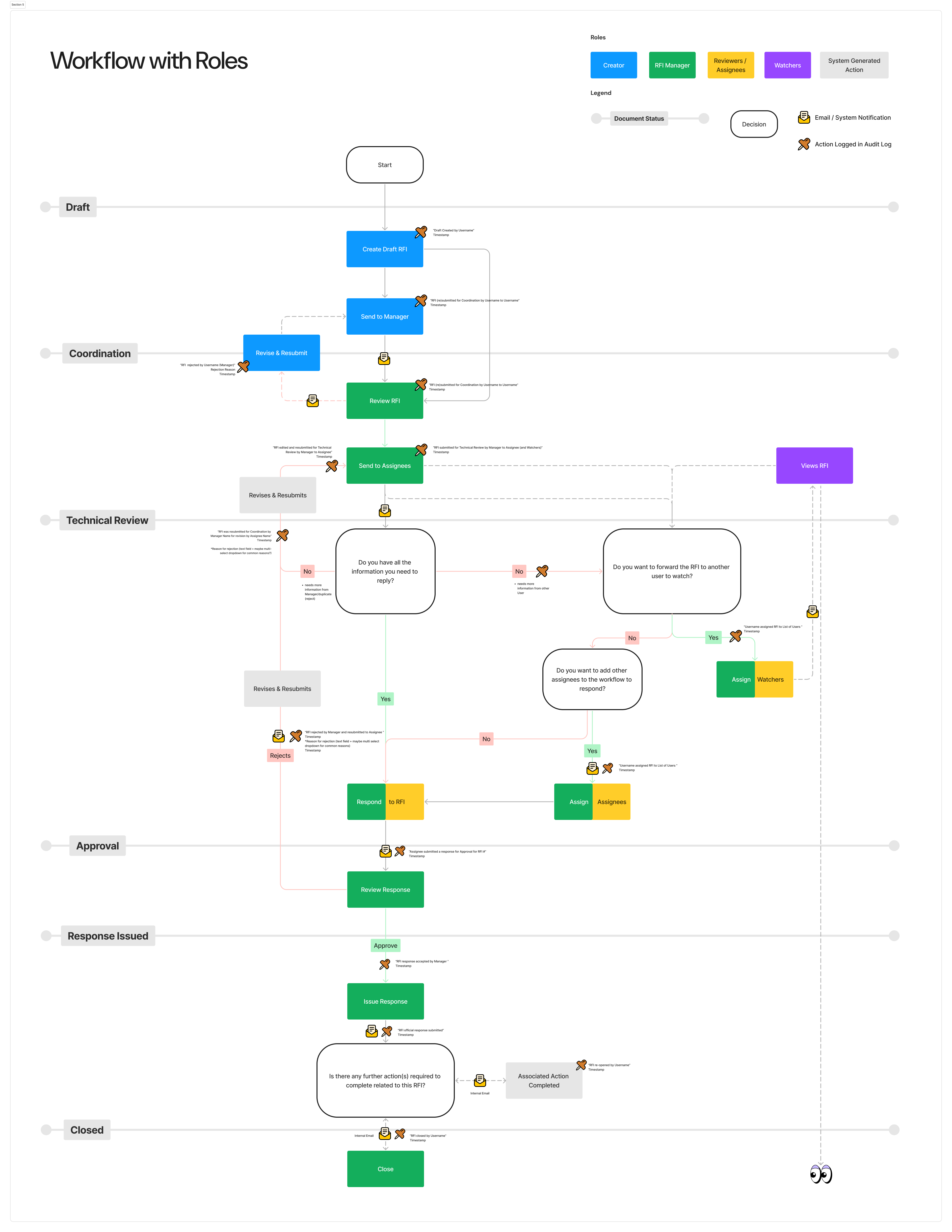
Printed workflow diagram titled RFI Workflow on a white background. A legend in the top right identifies five role colours: Creator in blue, RFI Manager in green, Reviewers and Assignees in yellow, Watchers in purple, and System Generated Action in grey. Additional legend items identify document status as a toggle, Decision as a rounded rectangle, Email or System Notification as an envelope icon, and Action Logged in Audit Log as a cross icon. The workflow flows vertically through six labelled horizontal stages. Draft: Start oval leads to Create Draft RFI, then Send to Manager. Coordination: Revise and Resubmit branches left on rejection, Review RFI continues downward. Technical Review: Send to Assignees leads to three decision diamonds asking whether the assignee has information to reply, whether to forward to another watcher, and whether to add assignees, with Assign Watchers and Assign Assignees actions branching accordingly. Revises and Resubmits and Rejects paths are also shown. Approval: Respond to RFI leads to Review Response. Response Issued: Approve leads to Issue Response and a decision asking whether further actions are required, with an Associated Action Completed branch. Closed: Close action ends the workflow.
The easy solution ≠ the right solution
The obvious fix would have been to give external consultants access to the platform. However, we understood through user research that consultants can work across multiple general contractors and aren’t going to adopt a new tool for each one. Requiring login access would have added friction without changing behaviour. Responses would still come through email, and manual re-entry would continue.
The goal wasn’t to get consultants into the system. It was to get their responses into the system.
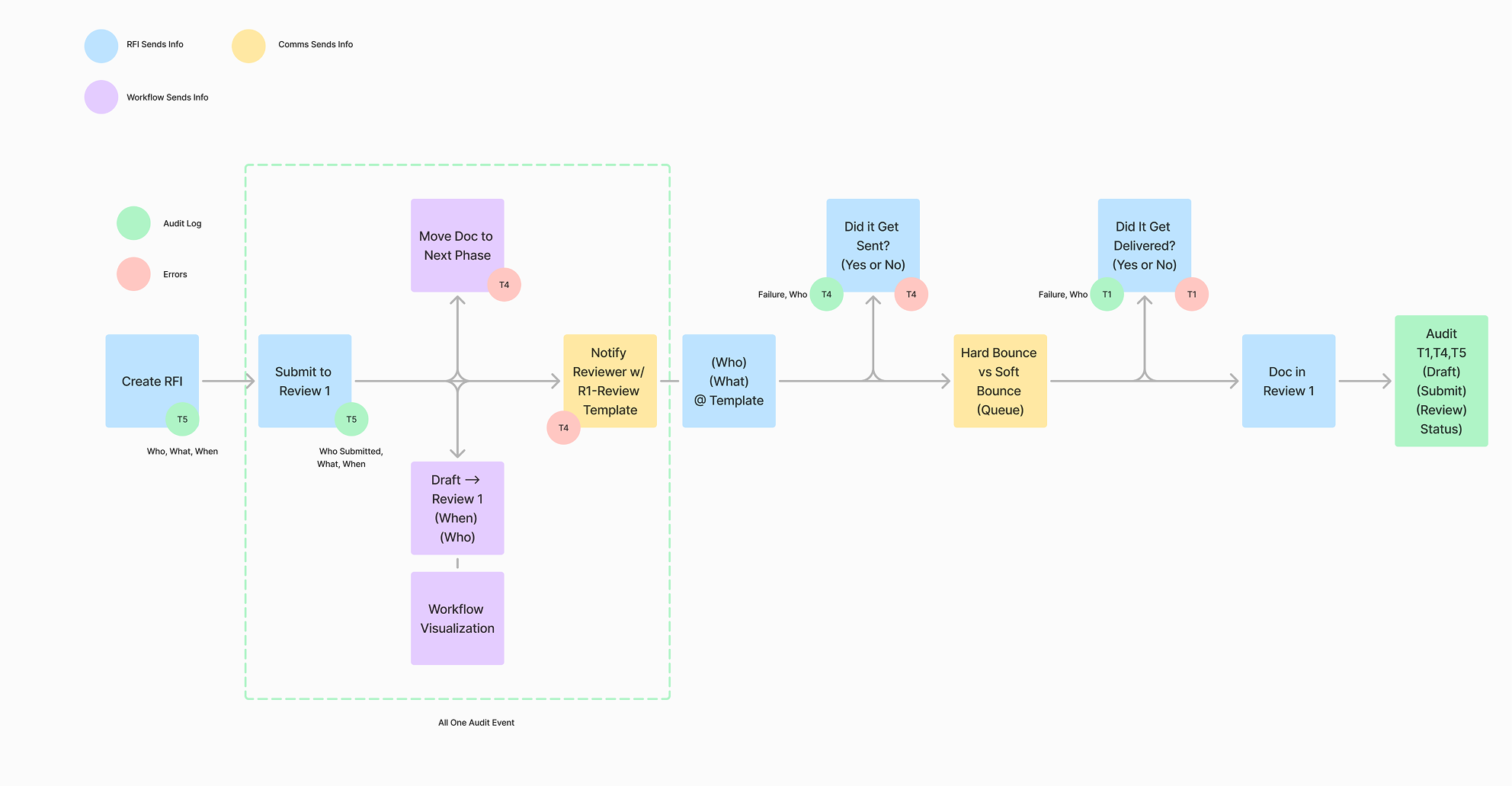
Process flow diagram on a white background with a legend showing three colour-coded node types: blue for RFI sends info, yellow for Comms sends info, and purple for Workflow sends info. Green circles indicate audit log events and pink circles indicate errors. The flow begins at Create RFI, annotated with Who, What, When. An arrow leads to Submit to Review 1, annotated with Who Submitted, What, When. Inside a dashed green box labelled All One Audit Event, three parallel actions branch off: a purple box Move Doc to Next Phase, a purple box Draft to Review 1 showing When and Who, and a purple box Workflow Visualization. A yellow box Notify Reviewer with R1 Review Template connects outward. The flow continues to a blue box labelled Who, What, At Template, then to a decision checking Did it Get Sent, with a failure path looping back. From there a blue box Hard Bounce vs Soft Bounce Queue leads to another decision Did It Get Delivered, with another failure loop. The flow ends at Doc in Review 1 and a green Audit box capturing Team 1, Team 4, Team 5 data across Draft, Submit, Review, and Status states.

Designing for real world workflows

The workflow engine rebuild allowed RFIs to evolve as projects do. Assignees and stages could change dynamically, reflecting actual conditions rather than forcing work into a rigid structure.
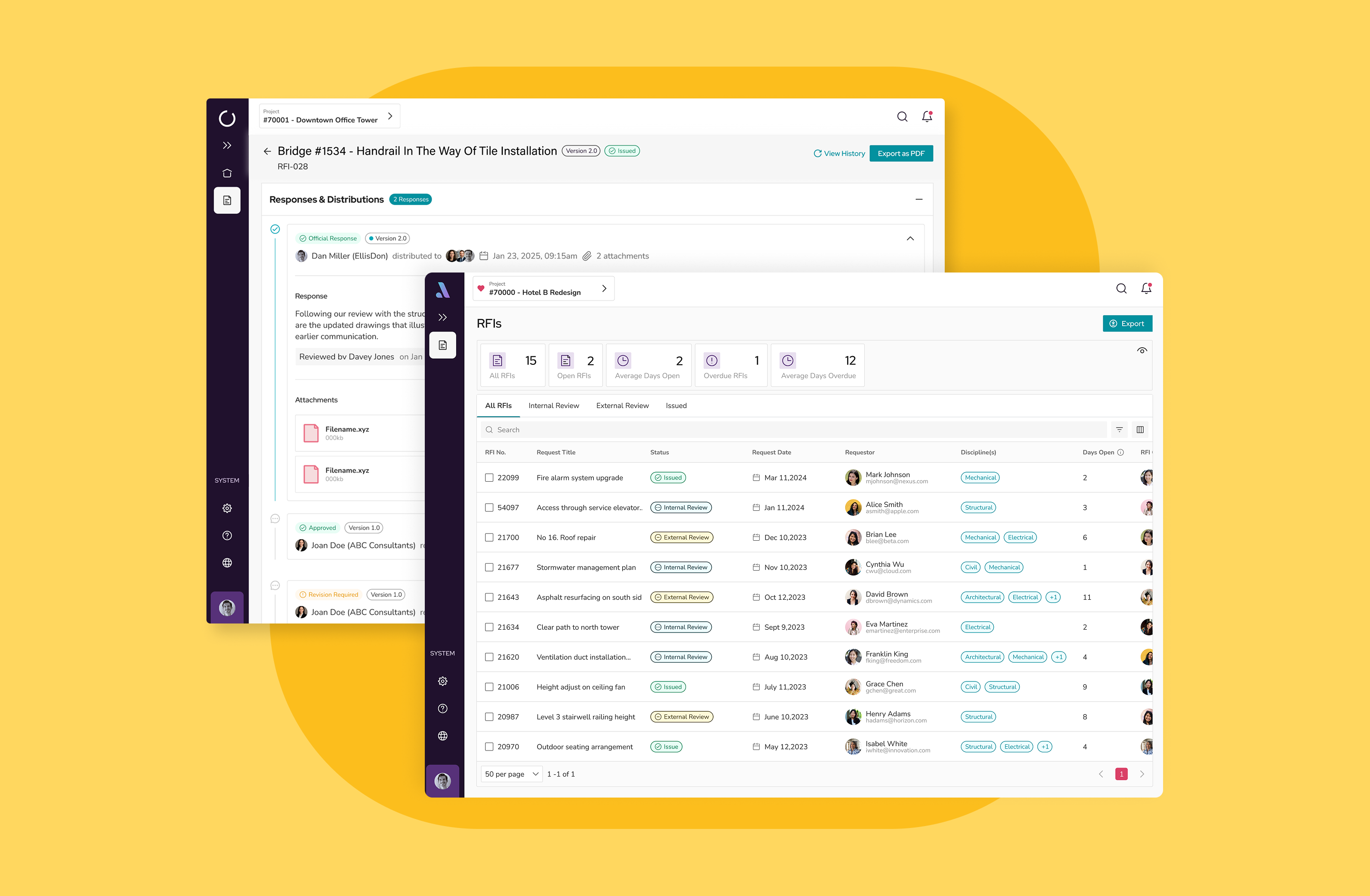
The RFI landing page table was redesigned to support scale, with filtering, sorting, saved views, and custom labels. Teams could finally manage RFIs across large projects, while leadership gained visibility into consultant performance like response times, delays, and workflow patterns.
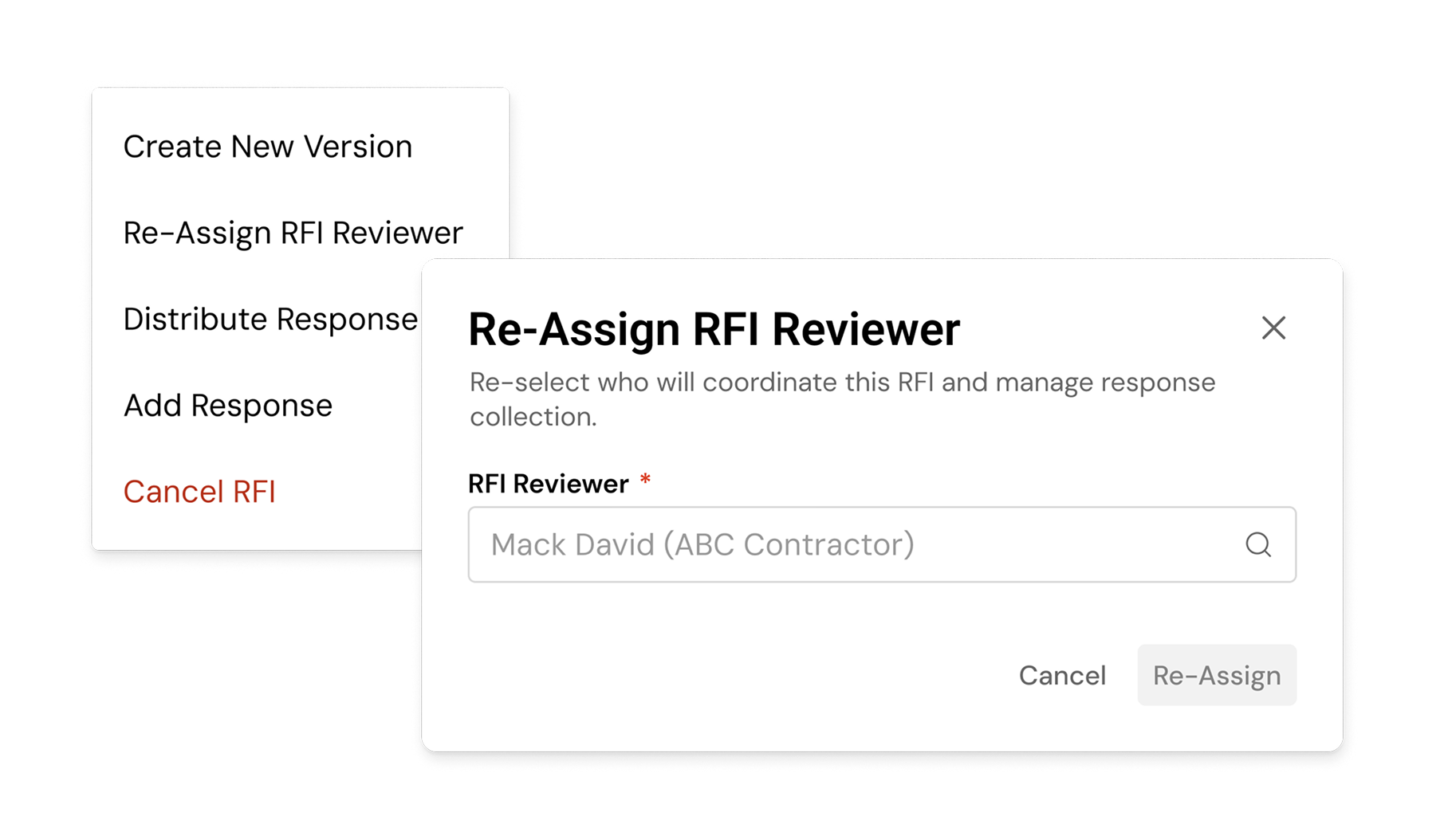
RFI action dropdown menu showing available document actions alongside a Re-Assign RFI Reviewer modal with a searchable reviewer field.

Impact

Internal teams reported reduced time spent on email triage and manual entry. Data quality improved as responses were captured accurately and in real time.More importantly, RFIs shifted from reactive to proactive. Field teams could log issues as they arose, rather than reconstructing them later. The record became a true record.

This approach of capturing external input without requiring external adoption became a model for other internal-external workflows across the organization! 

Hey there, I'm Dante – your friendly neighborhood design aficionado with a passion for pixels and a knack for turning ideas into visual magic

Design by Day, Dreams by Night

By day, I'm weaving through the vast realms of UX, sketching wireframes, and dancing with delightful color palettes. By night, you'll find me lost in a world of quirky illustrations and sipping on creativity potions.
Say Hi!
No items found.